eBA Login with Azure AD
What to Install:
- Node.js
- https://aka.ms/dotnet-core-applaunch?framework=Microsoft.NETCore.App&framework_version=5.0.17&arch=x64&rid=win10-x
- https://aka.ms/dotnet-core-applaunch?framework=Microsoft.AspNetCore.App&framework_version=5.0.0&arch=x64&rid=win10-x
What Needs to Be Adjusted:
eBAConfiguration
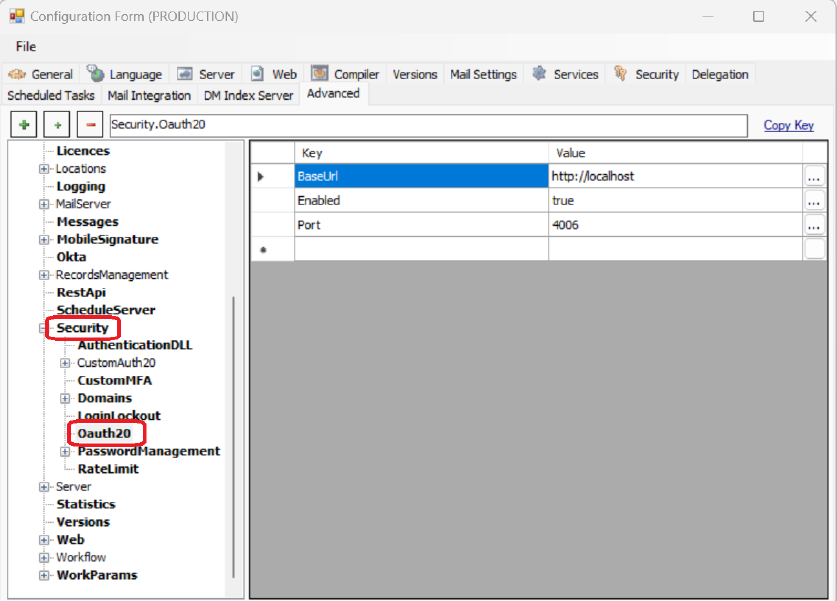
- Security
>Ouath20 breakdown should be added. - BaseUrl: Default eBA address must be defined.
- Enabled : The parameter that activates the AzureAD login.
- Port: Port information that will work on the Node.js side.
After the definitions to be made on the eBAConfiguration side, the eBAServer.exe.config file content should be edited.
eBAServer.exe.config
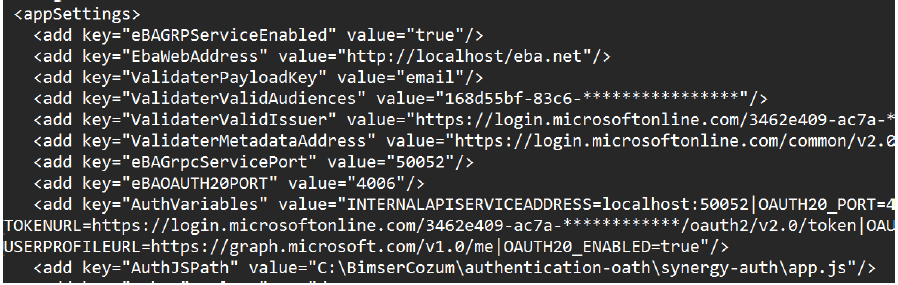
- eBAGRPServiceEnabled : The parameter that activates the service that will run in the background.
- eBAWebAddress : The url information in the eBAConfiguration Web part.
- ValidaterPayload: The value here is fixed as email. ExternalUsername information in this We buy it on value.
- ValidaterValidAudiences : ClientID information.
- eBAGrpcServicePort: The port information where the grpc service will run. An unused port can be defined.
- eBAOAUTH20PORT: Port defined on the Azure side.
- AuthJSPath : app.js in the authentication-oath\synergy-auth folder in the eBA directory The way should be given. (C:\BimserCozum\authentication-oath\synergy-auth\app.js)
AuthVariables :
INTERNALAPISERVICEADDRESS= localhost:50052 |OAUTH20_PORT= 4006 |OAUTH20_URL= http:/
/localhost:4006 |OAUTH20_AUTHORIZEURL=https://login.microsoftonline.com/ 3462e409-
AC7A-457A-
8bd0** /oauth2/v2.0/authorize|OAUTH20_TOKENURL=https://login.microsofton
line.com/ 3462E409-* /oauth2/v2.0/token|OAUTH20_CLIENTID= 168d55bf-83c6-
**** |OAUTH20_CLIENTSECRET= XKc8Q~u2urzy78LPO67JV~**** |OAUTH
_SCOPE=openid profile email user.read|OAUTH20_SCOPESEPARATOR=
|OAUTH20_USERPROFILEURL=https://graph.microsoft.com/v1.0/me|OAUTH20_ENABLED=true|CERTIFICATE_FILE_PATH=C:\SSL\fullchain.pem|PRIVATEKEY_FILE_PATH=C:\SSL\server.key
"/>
There are pem and key files in the config. These files should be discarded in the corresponding directory. (In the example, it is in the C:\SSL\ directory) These files are required for Azure AD login to work with SSL.
The Authvariables part is included as a whole. Where changes need to be made I colored it.
Except for ClientID and ClientSecret, the part I colored GREEN is the TenantID value. Entering the tenantID information defined in the customers' Azure environment into these sections required.
SystemManager:
- For example, for a user with a adogru@bimser.com account, the The value adogru must be entered in the externalusername information.
Usage:
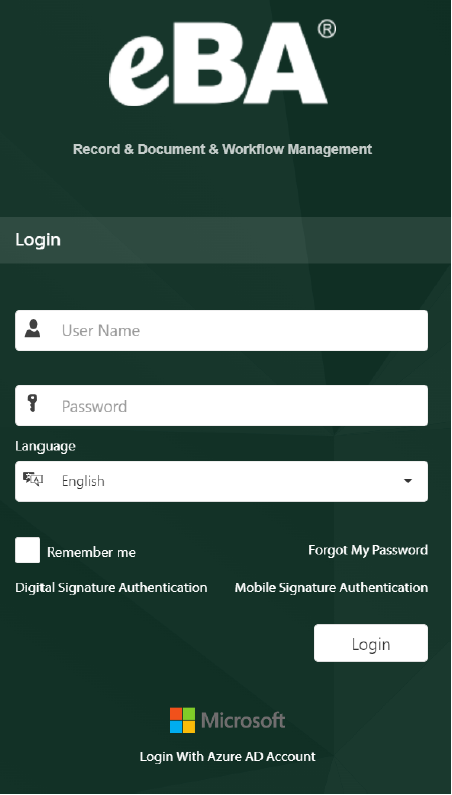
After the settings are made, the Azure AD login button becomes visible on the eBA login screen.
When clicked, it is directed to the microsoft login screen and after the user logs in, the relevant user is automatically logged in.
Considerations:
- To observe that eBAGRPService is working, you can check the TaskManager
>Details section.
This service is a service that stands up with eBA services.

- After logging in with Azure, instead of logging in to the user If it is directed to the login screen again, the following setting should be made.
eba.net > In the SessionState section of the Web.config file, "cookieSameSite="Strict"
Tests can be performed by changing the value in the form to Lax.
- Event Viewer
>Windows when an undetectable error is encountered part can be examined.