LIBRARY STORAGE CHANGE
Configuration Change Documentation
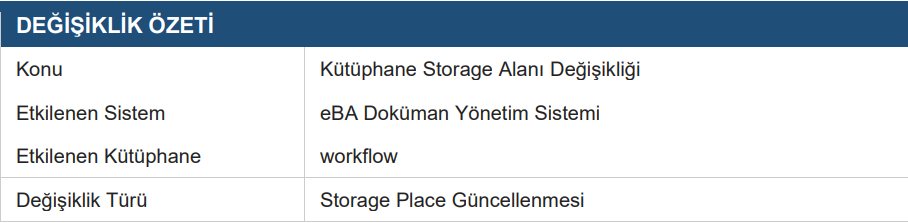
1. Purpose and Scope
This document is the Storage of libraries on the eBA Document Management System. How to change the Place (Storage Space) configuration and how this change is explains its effects on the
The change is made through the "Open > Properties > Management" tab
requires system administrator authority.
2. Current Situation
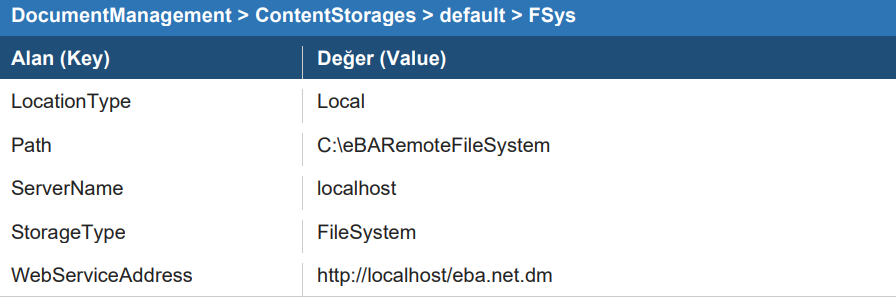
2.1 FSys (FileSystem) Configuration
The configuration information for the default storage area defined in the system is as follows: It is like:
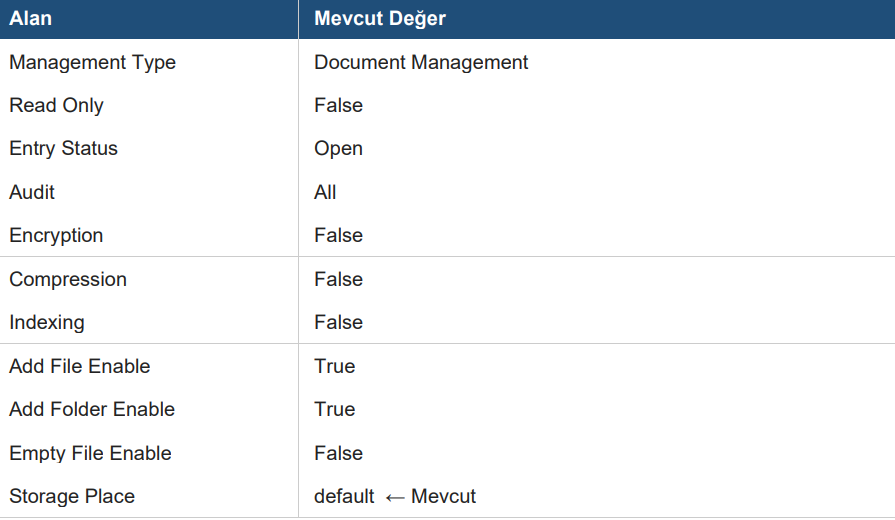
2.2 Library Features
Current Management settings for the Workflow library:
3. Amendment to be made
3.1 Storage Place Options
The Storage Place options defined in the system are as follows:

3.2 Step-by-Step Modification Procedure
Log in to the eBA Document Management System interface.
Go to the DocumentManagement folder from the left panel
Select the workflow library in the list (mark it with checkbox).
Go to "Open
>Properties" from the top menu.In the panel that opens, expand the Management tab.
Find the Storage Place area at the bottom.
Select the new storage space from the dropdown menu (default / FileStream).
Save the changes.