eBA EBYS Destruction Time and Authorization Reminder
This document explains the arguments and configurations required for the job in the EBYS module in the eBA application, which reminds the documents that are due for liquidation and the expired authorizations.
Important Notice
This tool only covers >=eBA Plus 10.0.9. Additionally, for this tool to work, it must be MailServer configured and operational.
Working Logic
It works in 2 different ways. The first method is to run it as a Job through the eBA Configuration Editor application, and another method is to run it directly at the OS level via Windows Task Scheduler. One can be preferred according to the need.
Installation
eBA Configuration Editor
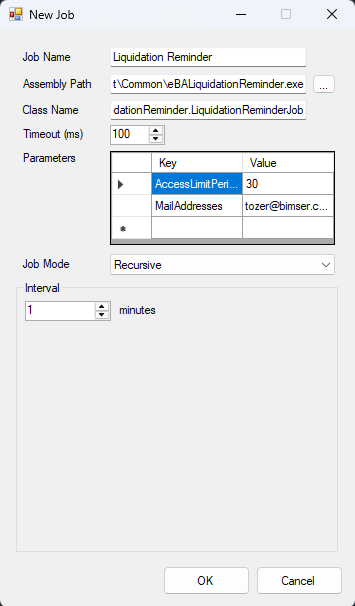
On the eBA Configuration Editor application, go to the Scheduled Tasks tab and click the New button. The information on the new job addition screen that opens is filled in as follows.
- Job Name: Liquidation Reminder
- Assembly Path: C:\BimserCozum\eBA\Common\eBALiquidationReminder.exe
- Class Name: eBALiquidationReminder.LiquidationReminderJob
- Timeout (ms): 100
- Job Mode: Can be set to work however you want it to work.
- Range: Can be set however you want it to work.
- Parameters:
- MailAddresses: This value allows you to define the addresses to which the information e-mail will go. Multiple addresses can be added separated by a comma (,). Like tozer@bimser.com,ebysadmin@bimser.com.
- AccessLimitPeriod: Not mandatory. If this value is not given, it defaults to 7 Days. It is calculated in days. It specifies how many days in advance the authorizations that will expire will be informed.
Windows Task Scheduler
The working logic in the eBA Configuration Editor is exactly the same, only the instance parameter must be passed as an extra.
''' shell Start-process -FilePath "C:\eBAProject\Development\Common\eBALiquidationReminder.exe" -ArgumentList "/mailaddresses:tozer@bimser.com,ebysadmin@bimser.com", "/accessLimitPeriod:60", "/instance: PRODUCTION"
After applying one of the above options, the services must be restarted. After the job is successfully employed, if there are documents whose liquidation year has expired, it sends the excel file stating the number of documents and containing the information of these documents, or if there are authorizations that are approaching the expiration of the authorization period, it sends them as a separate e-mail in the same way.

## Considerations
If it is run through the **eBA Configuration Editor** and the density of documents to be cleared is high, the **Timeout (ms)** field in the Job should be given higher values, otherwise the Job will not work and will print a log about the timeout it has received on the Log Viewer.