eBA Plus AI İle Veri Maskeleme: İlişkili Dokümanlar
Bu doküman eBA Plus'ta AI ile veri maskeleme yapısının İlişkili Dokümanlar nesnesi üzerinde nasıl kullanılacağını örneklemektedir.
Bu dokümanı okumadan önce eBA Plus AI İle Veri Maskeleme Dokümanı 'nın okunması gerekmektedir.
Giriş
Bu süreçte, süreç içindeki form üzerine bir ilişkili dokümanlar nesnesi eklenir. Süreç kullanılırken ilişkili dokümanlar nesnesine bir doküman eklendiği anda dokümanın maskelenmiş halinin DM tarafında süreç içerisinde belirtilen konuma eklenmesi sağlanır.
Doküman Yönetimi
Doküman yönetimi tarafında form üzerindeki İlişkili Dokümanlar nesnesine eklenen dokümanların ve bu dokümanların AI ile maskelenmiş halinin tutulacağı Data Masking kütüphanesi ve altına Related Documents klasörü oluşturulmalıdır.
İş Akış Sürecini Tasarlama
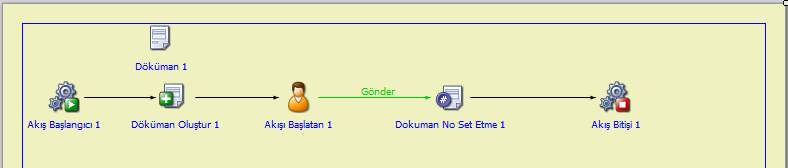
Workflow Studio’da yeni bir süreç tanımlanır. Yapılacak örnek için Workflow Project tipinde bir süreç yeterli olacaktır.
Akış tarafı olduğu gibi bırakılabilir asıl işlemler form tarafında yapılacaktır.
Ardından Workflow Studio'da Projeye sağ tıklayıp Project Properties -> Reference Files sekmesinden aşağıdaki şekilde eBAPI.dll'i referans olarak eklenir.
%SystemPath%\Common\eBAPI.dll
Form Tasarlama
Süreç içindeki forma bir adet İlişkili Dokümanlar nesnesi eklenir. Nesnenin Actions sekmesinden Add, Delete ve View seçenekleri seçilir.
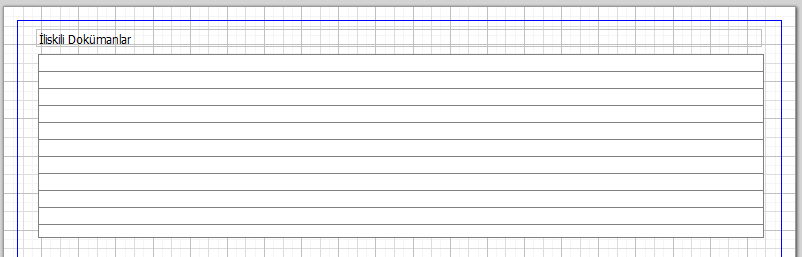
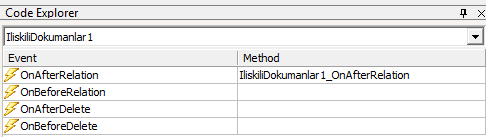
Ardından nesnenin OnAfterRelation eventi açılır.
Daha sonra form kodunun using tanımlamalarına aşağıdaki değerler eklenmelidir.
using eBAPI;
using eBAPI.Connection;
using eBAPI.DocumentManagement;
Akabinde doküman içerisinde hangi kategorideki veriler nasıl maskelenecekse bu değerler tanımlanır.
List<MaskedDataOption> showOptions = new List<MaskedDataOption>
{
    new MaskedDataOption
    {
        Category = DataCategories.Unknown,
        ActionType = DataMaskingActionTypes.Change,
        ActionValue = "[UNKNOWN]",
        RestrictedShowOptions = null
    },
    new MaskedDataOption
    {
        Category = DataCategories.FullName,
        ActionType = DataMaskingActionTypes.ShowOnlyFirstCharacters,
        ActionValue = null,
        RestrictedShowOptions = null
    },
    new MaskedDataOption
    {
        Category = DataCategories.Address,
        ActionType = DataMaskingActionTypes.Change,
        ActionValue = "[GİZLİ]",
        RestrictedShowOptions = null
    },
    new MaskedDataOption
    {
        Category = DataCategories.Email,
        ActionType = DataMaskingActionTypes.Hide,
        ActionValue = null,
        RestrictedShowOptions = null
    },
    new MaskedDataOption
    {
        Category = DataCategories.NationalIdNumber,
        ActionType = DataMaskingActionTypes.RestrictedShow,
        ActionValue = null,
        RestrictedShowOptions = new Dictionary<DataRestrictedShowOptions, int>
        {
            {DataRestrictedShowOptions.ShowFirstXCharacters, 3}
        }
    },
    new MaskedDataOption
    {
        Category = DataCategories.TaxNumber,
        ActionType = DataMaskingActionTypes.RestrictedShow,
        ActionValue = null,
        RestrictedShowOptions = new Dictionary<DataRestrictedShowOptions, int>
        {
            {DataRestrictedShowOptions.ShowLastXCharacters, 3}
        }
    },
    new MaskedDataOption
    {
        Category = DataCategories.SocialSecurityNumber,
        ActionType = DataMaskingActionTypes.RestrictedShow,
        ActionValue = null,
        RestrictedShowOptions = new Dictionary<DataRestrictedShowOptions, int>
        {
            {DataRestrictedShowOptions.ShowFirstLastXCharacters, 3}
        }
    },
    new MaskedDataOption
    {
        Category = DataCategories.CreditCardNumber,
        ActionType = DataMaskingActionTypes.RestrictedShow,
        ActionValue = null,
        RestrictedShowOptions = new Dictionary<DataRestrictedShowOptions, int>
        {
            {DataRestrictedShowOptions.HideFirstXCharacters, 3}
        }
    },
    new MaskedDataOption
    {
        Category = DataCategories.Iban,
        ActionType = DataMaskingActionTypes.RestrictedShow,
        ActionValue = null,
        RestrictedShowOptions = new Dictionary<DataRestrictedShowOptions, int>
        {
            {DataRestrictedShowOptions.HideLastXCharacters, 3}
        }
    },
    new MaskedDataOption
    {
        Category = DataCategories.BankAccountNumber,
        ActionType = DataMaskingActionTypes.Hide,
        ActionValue = null,
        RestrictedShowOptions = null
    },
    new MaskedDataOption
    {
        Category = DataCategories.InstitutionName,
        ActionType = DataMaskingActionTypes.RestrictedShow,
        ActionValue = null,
        RestrictedShowOptions = new Dictionary<DataRestrictedShowOptions, int>
        {
            {DataRestrictedShowOptions.ShowFirstXCharacters, 1}
        }
    },
    new MaskedDataOption
    {
        Category = DataCategories.Country,
        ActionType = DataMaskingActionTypes.Change,
        ActionValue = "[COUNTRY]",
        RestrictedShowOptions = null
    },
    new MaskedDataOption
    {
        Category = DataCategories.City,
        ActionType = DataMaskingActionTypes.Change,
        ActionValue = "[CITY]",
        RestrictedShowOptions = null
    },
    new MaskedDataOption
    {
        Category = DataCategories.IPAddress,
        ActionType = DataMaskingActionTypes.RestrictedShow,
        ActionValue = null,
        RestrictedShowOptions = new Dictionary<DataRestrictedShowOptions, int>
        {
            {DataRestrictedShowOptions.ShowFirstLastXCharacters, 2}
        }
    },
    new MaskedDataOption
    {
        Category = DataCategories.Date,
        ActionType = DataMaskingActionTypes.Change,
        ActionValue = "[DATE]",
        RestrictedShowOptions = null
    },
    new MaskedDataOption
    {
        Category = DataCategories.InvoiceNumber,
        ActionType = DataMaskingActionTypes.ShowOnlyFirstCharacters,
        ActionValue = null,
        RestrictedShowOptions = null
    },
    new MaskedDataOption
    {
        Category = DataCategories.Website,
        ActionType = DataMaskingActionTypes.Change,
        ActionValue = "[LINK]",
        RestrictedShowOptions = null
    },
    new MaskedDataOption
    {
        Category = DataCategories.Salary,
        ActionType = DataMaskingActionTypes.Hide,
        ActionValue = null,
        RestrictedShowOptions = null
    },
    new MaskedDataOption
    {
        Category = DataCategories.Amount,
        ActionType = DataMaskingActionTypes.Change,
        ActionValue = "[AMOUNT]",
        RestrictedShowOptions = null
    },
    new MaskedDataOption
    {
        Category = DataCategories.BankName,
        ActionType = DataMaskingActionTypes.ShowOnlyFirstCharacters,
        ActionValue = null,
        RestrictedShowOptions = null
    }
};
Ardından form üzerinde ki ilişkili dokümanlar nesnesinin OnAfterRelation eventi içine aşağıdaki kodlar eklenmelidir.
public void IliskiliDokumanlar1_OnAfterRelation(object sender, eBARelationFileEventArgs e)
{
    eBAConnection con = CreateServerConnection();
    con.Open();

    string path = "Data Masking/Related Documents/" + Path.GetFileName(e.Filename);
    con.FileSystem.CreateMaskedDocument(e.Filename, showOptions, path);

    con.Close();
}
Bu aşamadan sonra proje derlenmelidir.
Çalıştırma
Süreç açıldığında ilişkili dokümanlar nesnesine bir doküman eklenir, bu anda doküman maskelenir ve süreç içinde belirtilen DM konumuna maskelenmiş hali kopyalanır.
Maskeleme işlemi doküman boyutuna göre ortalama 15-20 saniye sürebilir. Bir hata oluştuğu durumda Olay Günlük Görüntüleyici üzerindeki Workflow Service kategorisinden takibi sağlanabilir.