eBA Plus AI İle Veri Maskeleme: DM Oluşturma İş Akışı
Bu doküman eBA Plus'ta AI ile veri maskeleme yapısında DM Oluşturma iş Akışını örneklemektedir.
Bu dokümanı okumadan önce eBA Plus AI İle Veri Maskeleme Dokümanı 'nın okunması gerekmektedir.
Giriş
Bu süreçte doküman yönetimine hassas veriler içeren yeni bir doküman eklendiğinde süreç tetilenecek, dokümanın maskelenmiş hali doküman yönetiminde belirtilen konuma kaydedilecektir.
Oluşturma İş Akışı Sürecini Tasarlama
Workflow Studio’da oluşturma iş akışı için yeni bir süreç tanımlanır. Yapılacak örnek için Flow Project tipinde bir süreç yeterli olacaktır. Süreçte doküman eklendiğinde, doküman akıştaki fonksiyon nesnesinde AI ile maskelenip süreç içinde belirtilen konuma kaydedilecektir. Akış aşağıdaki gibi tasarlanacaktır.

Akışa yeni bir değişken eklenir. Bu değişken adının filename olması zorunludur. Akış tetiklendiğinde bu değişkene eklenen dokümanın yol bilgisi eBA Plus tarafından atanır.
Değişkene dışarıdan ulaşılabilir olması için, Link sekmesinde Public seçeneği işaretlenir.

Workflow Studio'da Projeye sağ tıklayıp Project Properties -> Reference Files sekmesinden aşağıdaki şekilde eBAPI.dll'i referans olarak eklenir.
%SystemPath%\Common\eBAPI.dll
Daha sonra akış kodunun using tanımlamalarına aşağıdaki değerler eklenmelidir.
using eBAPI;
using eBAPI.Connection;
using eBAPI.DocumentManagement;
Akabinde doküman içerisinde hangi kategorideki veriler nasıl maskelenecekse bu değerler tanımlanır.
List<MaskedDataOption> showOptions = new List<MaskedDataOption>
{
    new MaskedDataOption
    {
        Category = DataCategories.Unknown,
        ActionType = DataMaskingActionTypes.Change,
        ActionValue = "[UNKNOWN]",
        RestrictedShowOptions = null
    },
    new MaskedDataOption
    {
        Category = DataCategories.FullName,
        ActionType = DataMaskingActionTypes.ShowOnlyFirstCharacters,
        ActionValue = null,
        RestrictedShowOptions = null
    },
    new MaskedDataOption
    {
        Category = DataCategories.Address,
        ActionType = DataMaskingActionTypes.Change,
        ActionValue = "[GİZLİ]",
        RestrictedShowOptions = null
    },
    new MaskedDataOption
    {
        Category = DataCategories.Email,
        ActionType = DataMaskingActionTypes.Hide,
        ActionValue = null,
        RestrictedShowOptions = null
    },
    new MaskedDataOption
    {
        Category = DataCategories.NationalIdNumber,
        ActionType = DataMaskingActionTypes.RestrictedShow,
        ActionValue = null,
        RestrictedShowOptions = new Dictionary<DataRestrictedShowOptions, int>
        {
            {DataRestrictedShowOptions.ShowFirstXCharacters, 3}
        }
    },
    new MaskedDataOption
    {
        Category = DataCategories.TaxNumber,
        ActionType = DataMaskingActionTypes.RestrictedShow,
        ActionValue = null,
        RestrictedShowOptions = new Dictionary<DataRestrictedShowOptions, int>
        {
            {DataRestrictedShowOptions.ShowLastXCharacters, 3}
        }
    },
    new MaskedDataOption
    {
        Category = DataCategories.SocialSecurityNumber,
        ActionType = DataMaskingActionTypes.RestrictedShow,
        ActionValue = null,
        RestrictedShowOptions = new Dictionary<DataRestrictedShowOptions, int>
        {
            {DataRestrictedShowOptions.ShowFirstLastXCharacters, 3}
        }
    },
    new MaskedDataOption
    {
        Category = DataCategories.CreditCardNumber,
        ActionType = DataMaskingActionTypes.RestrictedShow,
        ActionValue = null,
        RestrictedShowOptions = new Dictionary<DataRestrictedShowOptions, int>
        {
            {DataRestrictedShowOptions.HideFirstXCharacters, 3}
        }
    },
    new MaskedDataOption
    {
        Category = DataCategories.Iban,
        ActionType = DataMaskingActionTypes.RestrictedShow,
        ActionValue = null,
        RestrictedShowOptions = new Dictionary<DataRestrictedShowOptions, int>
        {
            {DataRestrictedShowOptions.HideLastXCharacters, 3}
        }
    },
    new MaskedDataOption
    {
        Category = DataCategories.BankAccountNumber,
        ActionType = DataMaskingActionTypes.Hide,
        ActionValue = null,
        RestrictedShowOptions = null
    },
    new MaskedDataOption
    {
        Category = DataCategories.InstitutionName,
        ActionType = DataMaskingActionTypes.RestrictedShow,
        ActionValue = null,
        RestrictedShowOptions = new Dictionary<DataRestrictedShowOptions, int>
        {
            {DataRestrictedShowOptions.ShowFirstXCharacters, 1}
        }
    },
    new MaskedDataOption
    {
        Category = DataCategories.Country,
        ActionType = DataMaskingActionTypes.Change,
        ActionValue = "[COUNTRY]",
        RestrictedShowOptions = null
    },
    new MaskedDataOption
    {
        Category = DataCategories.City,
        ActionType = DataMaskingActionTypes.Change,
        ActionValue = "[CITY]",
        RestrictedShowOptions = null
    },
    new MaskedDataOption
    {
        Category = DataCategories.IPAddress,
        ActionType = DataMaskingActionTypes.RestrictedShow,
        ActionValue = null,
        RestrictedShowOptions = new Dictionary<DataRestrictedShowOptions, int>
        {
            {DataRestrictedShowOptions.ShowFirstLastXCharacters, 2}
        }
    },
    new MaskedDataOption
    {
        Category = DataCategories.Date,
        ActionType = DataMaskingActionTypes.Change,
        ActionValue = "[DATE]",
        RestrictedShowOptions = null
    },
    new MaskedDataOption
    {
        Category = DataCategories.InvoiceNumber,
        ActionType = DataMaskingActionTypes.ShowOnlyFirstCharacters,
        ActionValue = null,
        RestrictedShowOptions = null
    },
    new MaskedDataOption
    {
        Category = DataCategories.Website,
        ActionType = DataMaskingActionTypes.Change,
        ActionValue = "[LINK]",
        RestrictedShowOptions = null
    },
    new MaskedDataOption
    {
        Category = DataCategories.Salary,
        ActionType = DataMaskingActionTypes.Hide,
        ActionValue = null,
        RestrictedShowOptions = null
    },
    new MaskedDataOption
    {
        Category = DataCategories.Amount,
        ActionType = DataMaskingActionTypes.Change,
        ActionValue = "[AMOUNT]",
        RestrictedShowOptions = null
    },
    new MaskedDataOption
    {
        Category = DataCategories.BankName,
        ActionType = DataMaskingActionTypes.ShowOnlyFirstCharacters,
        ActionValue = null,
        RestrictedShowOptions = null
    }
};
Ardından akış içerisinde bulunan fonksiyon nesnesine aşağıdaki kodlar eklenmelidir.
public void MaskDocument_Execute()
{
    eBAConnection con = CreateServerConnection();
    con.Open()

    string path = "Sözleşmeler/Maskelenmiş Evraklar/" + Path.GetFileName(filename.Value);
    con.FileSystem.CreateMaskedDocument(filename.Value, showOptions, path);

    con.Close();
}
Bu aşamadan sonra proje derlenmelidir.
Doküman Yönetiminde Oluşturma İş Akışını Seçme
Doküman Yönetiminde maskelenecek doküman nereye eklenecekse kütüphanesi/klasörü oluşturulur. Örnek olarak Sözleşmeler kütüphanesi ve içerisine Orijinal Evraklar ve Maskelenmiş Evraklar olmak üzere 2 klasör eklenir.
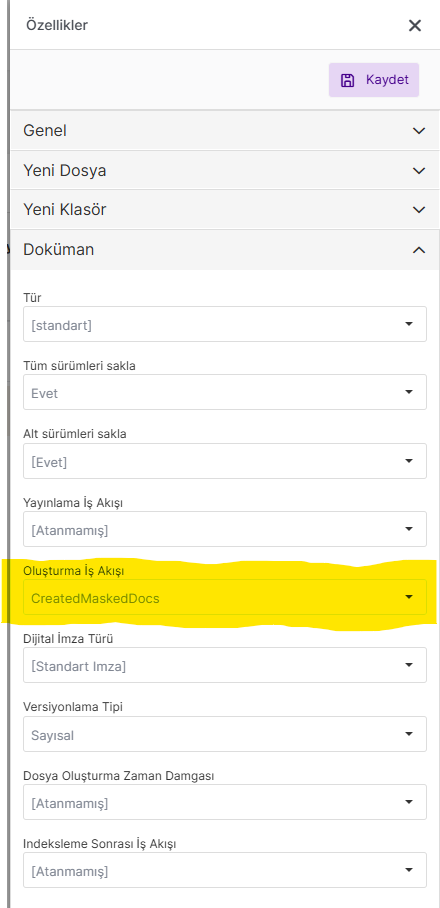
Ardından Orijinal Evraklar klasörünün Aç -> Özellikler -> Doküman sekmesi altında ki Oluşturma İş Akışı seçeneği yaptığımız süreç olarak seçilir.
Çalıştırma
Orijinal Evraklar klasörüne artık doküman eklediğimizde seçtiğimiz süreç tetiklenecek, dokümanı maskeleyecek ve süreç içerisinde belirttiğimiz Maskelenmiş Evraklar konumuna kaydedilecektir.
Maskeleme işlemi doküman boyutuna göre ortalama 15-20 saniye sürebilir. Bir hata oluştuğu durumda Olay Günlük Görüntüleyici üzerindeki Workflow Service kategorisinden takibi sağlanabilir.