Data Masking with eBA Plus AI: DM Creation Workflow
This document exemplifies the DM Creation workflow in a data masking structure with AI in eBA Plus.
Before reading this document eBA Plus Data Masking with AI Document should be read.
Introduction
In this process, when a new document containing sensitive data is added to the document management, the process will be triggered and the masked version of the document will be saved to the specified location in the document management.
Designing the Creation Workflow Process
A new process is defined for the creation workflow in Workflow Studio. A Flow Project type process will be sufficient for the example to be made. When a document is added in the process, the document will be masked with AI in the function object in the flow and saved to the specified location in the process. The flow will be designed as follows.

A new variable is added to the flow. This variable name must be filename. When the flow is triggered, the path information of the document added to this variable is assigned by eBA Plus.
In order for the variable to be accessible from the outside, the Public option is selected in the Link tab.

In Workflow Studio, right-click on the Project and add eBAPI.dll as a reference from the Project Properties -> Reference Files tab as follows.
- '%SystemPath%\Common\eBAPI.dll'
Then, the following values should be added to the using definitions of the flow code.
'''csharp using eBAPI; using eBAPI.Connection; using eBAPI.DocumentManagement;
Then, these values are defined in which category of data will be masked in the document.

'''csharp
List```<```MaskedDataOption```>``` showOptions = new List```<```MaskedDataOption```>```
{
    new MaskedDataOption
    {
        Category = DataCategories.Unknown,
        ActionType = DataMaskingActionTypes.Change,
        ActionValue = "[UNKNOWN]",
        RestrictedShowOptions = null
    },
    new MaskedDataOption
    {
        Category = DataCategories.FullName,
        ActionType = DataMaskingActionTypes.ShowOnlyFirstCharacters,
        ActionValue = null,
        RestrictedShowOptions = null
    },
    new MaskedDataOption
    {
        Category = DataCategories.Address,
        ActionType = DataMaskingActionTypes.Change,
        ActionValue = "[HIDDEN]",
        RestrictedShowOptions = null
    },
    new MaskedDataOption
    {
        Category = DataCategories.Email,
        ActionType = DataMaskingActionTypes.Hide,
        ActionValue = null,
        RestrictedShowOptions = null
    },
    new MaskedDataOption
    {
        Category = DataCategories.NationalIdNumber,
        ActionType = DataMaskingActionTypes.RestrictedShow,
        ActionValue = null,
        RestrictedShowOptions = new Dictionary```<```DataRestrictedShowOptions, int```>```
        {
            {DataRestrictedShowOptions.ShowFirstXCharacters, 3}
        }
    },
    new MaskedDataOption
    {
        Category = DataCategories.TaxNumber,
        ActionType = DataMaskingActionTypes.RestrictedShow,
        ActionValue = null,
        RestrictedShowOptions = new Dictionary```<```DataRestrictedShowOptions, int```>```
        {
            {DataRestrictedShowOptions.ShowLastXCharacters, 3}
        }
    },
    new MaskedDataOption
    {
        Category = DataCategories.SocialSecurityNumber,
        ActionType = DataMaskingActionTypes.RestrictedShow,
        ActionValue = null,
        RestrictedShowOptions = new Dictionary```<```DataRestrictedShowOptions, int```>```
        {
            {DataRestrictedShowOptions.ShowFirstLastXCharacters, 3}
        }
    },
    new MaskedDataOption
    {
        Category = DataCategories.CreditCardNumber,
        ActionType = DataMaskingActionTypes.RestrictedShow,
        ActionValue = null,
        RestrictedShowOptions = new Dictionary```<```DataRestrictedShowOptions, int```>```
        {
            {DataRestrictedShowOptions.HideFirstXCharacters, 3}
        }
    },
    new MaskedDataOption
    {
        Category = DataCategories.Iban,
        ActionType = DataMaskingActionTypes.RestrictedShow,
        ActionValue = null,
        RestrictedShowOptions = new Dictionary```<```DataRestrictedShowOptions, int```>```
        {
            {DataRestrictedShowOptions.HideLastXCharacters, 3}
        }
    },
    new MaskedDataOption
    {
        Category = DataCategories.BankAccountNumber,
        ActionType = DataMaskingActionTypes.Hide,
        ActionValue = null,
        RestrictedShowOptions = null
    },
    new MaskedDataOption
    {
        Category = DataCategories.InstitutionName,
        ActionType = DataMaskingActionTypes.RestrictedShow,
        ActionValue = null,
        RestrictedShowOptions = new Dictionary```<```DataRestrictedShowOptions, int```>```
        {
            {DataRestrictedShowOptions.ShowFirstXCharacters, 1}
        }
    },
    new MaskedDataOption
    {
        Category = DataCategories.Country,
        ActionType = DataMaskingActionTypes.Change,
        ActionValue = "[COUNTRY]",
        RestrictedShowOptions = null
    },
    new MaskedDataOption
    {
        Category = DataCategories.City,
        ActionType = DataMaskingActionTypes.Change,
        ActionValue = "[CITY]",
        RestrictedShowOptions = null
    },
    new MaskedDataOption
    {
        Category = DataCategories.IPAddress,
        ActionType = DataMaskingActionTypes.RestrictedShow,
        ActionValue = null,
        RestrictedShowOptions = new Dictionary```<```DataRestrictedShowOptions, int```>```
        {
            {DataRestrictedShowOptions.ShowFirstLastXCharacters, 2}
        }
    },
    new MaskedDataOption
    {
        Category = DataCategories.Date,
        ActionType = DataMaskingActionTypes.Change,
        ActionValue = "[DATE]",
        RestrictedShowOptions = null
    },
    new MaskedDataOption
    {
        Category = DataCategories.InvoiceNumber,
        ActionType = DataMaskingActionTypes.ShowOnlyFirstCharacters,
        ActionValue = null,
        RestrictedShowOptions = null
    },
    new MaskedDataOption
    {
        Category = DataCategories.Website,
        ActionType = DataMaskingActionTypes.Change,
        ActionValue = "[LINK]",
        RestrictedShowOptions = null
    },
    new MaskedDataOption
    {
        Category = DataCategories.Salary,
        ActionType = DataMaskingActionTypes.Hide,
        ActionValue = null,
        RestrictedShowOptions = null
    },
    new MaskedDataOption
    {
        Category = DataCategories.Amount,
        ActionType = DataMaskingActionTypes.Change,
        ActionValue = "[AMOUNT]",
        RestrictedShowOptions = null
    },
    new MaskedDataOption
    {
        Category = DataCategories.BankName,
        ActionType = DataMaskingActionTypes.ShowOnlyFirstCharacters,
        ActionValue = null,
        RestrictedShowOptions = null
    }
};
Then, the following codes should be added to the function object in the flow.
'''csharp public void MaskDocument_Execute() { eBAConnection con = CreateServerConnection(); con. Open()
string path = "Contracts/Masked Documents/" + Path.GetFileName(filename. Value); con. FileSystem.CreateMaskedDocument(filename. Value, showOptions, path);
con. close(); }
After this stage, the project should be compiled.
## Choosing the Create Workflow in Document Management
In Document Management, the library/folder is created wherever the document to be masked will be added. For example, the **Contracts** library and 2 folders, **Original Documents** and **Masked Documents**, are added to it.
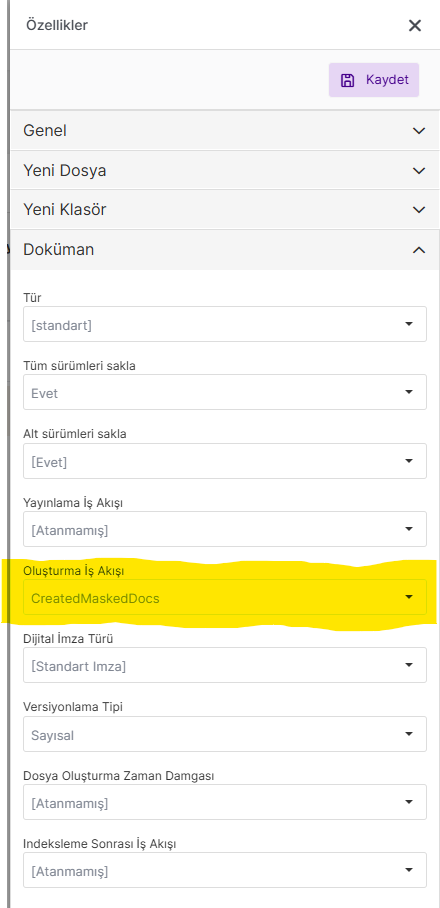
Then, the **Creation Workflow** option under the **Open** -```>``` **Properties** -```>``` **Document** tab of the **Original Documents** folder is selected as the process we have done.
## Operation
When we add a document to the **Original Documents** folder, the process we selected will be triggered, it will mask the document and it will be saved in the **Masked Documents** location we specified during the process.
The masking process may take an average of 15-20 seconds depending on the document size. In case of an error, it can be tracked from the **Workflow Service** category on the **Event Log Viewer**.