Bimser Synergy 2025 R2 Release Notes
OVERVIEW
This document covers the new features, enhancements, and bug fixes that come with the 2025 R2 version of the Bimser Synergy CSP platform.
This version was released to enhance user experience, expand AI-powered features, and improve performance and reliability across the system.
KEY IMPROVEMENTS
This section introduces the most notable new features added to the Synergy CSP platform. AI assistants that enhance user experience, new integrations, innovations in the developer interface, and significant updates to improve overall system efficiency are all presented under this heading.
Bimser Synergy AI
AI Assistant – Search Web / Search Documentation
The AI assistant has been given the ability to perform more detailed analysis by bringing search options from web search and documentation.
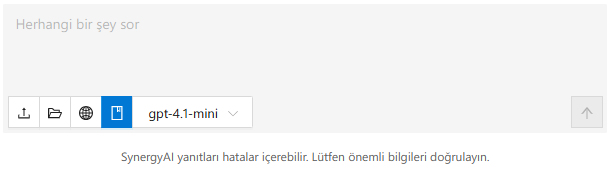
The respective options can be managed independently of each other. According to the affected feature, responses are generated only according to the analysis made by including Bimser Synergy usage documents or search results on the web.
AI Assistant – File Attachment Feature
It was enabled to add files to the artificial intelligence assistant from the Document Management module or local file system and to receive artificial intelligence support through the added files.
In order to add files from Document Management, the user must also have DYS -> Artificial Intelligence Supported Document Assistant authorization.
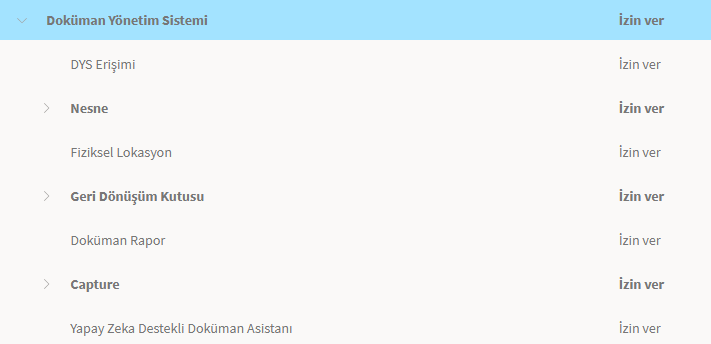
Additional Information: In this context, the artificial intelligence assistant / start chat function in the Document Management module has also been enabled to be done from the artificial intelligence assistant chat panel.
AI Assistant – Visual Revisions
Added placeholder to the command input field.
Files can be added from the local file system with the drag-and-drop method.
It has been enabled to copy text to the command input field with the copy-paste method.
The artificial intelligence assistant panel can be used in full screen.
Updated the Start Chat and Refresh Cache button names to New Chat and Clear Chat.
The New Chat button starts a new session in the AI assistant panel. If a project is open in the IDE, it responds with the most up-to-date version of the project.
- The Clear Chat button responds to the conversation with the artificial intelligence assistant in the same chat session by clearing the screen and if a project is open in the IDE, it responds to the most up-to-date version of the project. Since it continues over the existing chat, the information learned in the chat and the user's requests and commands in the chat are remembered.
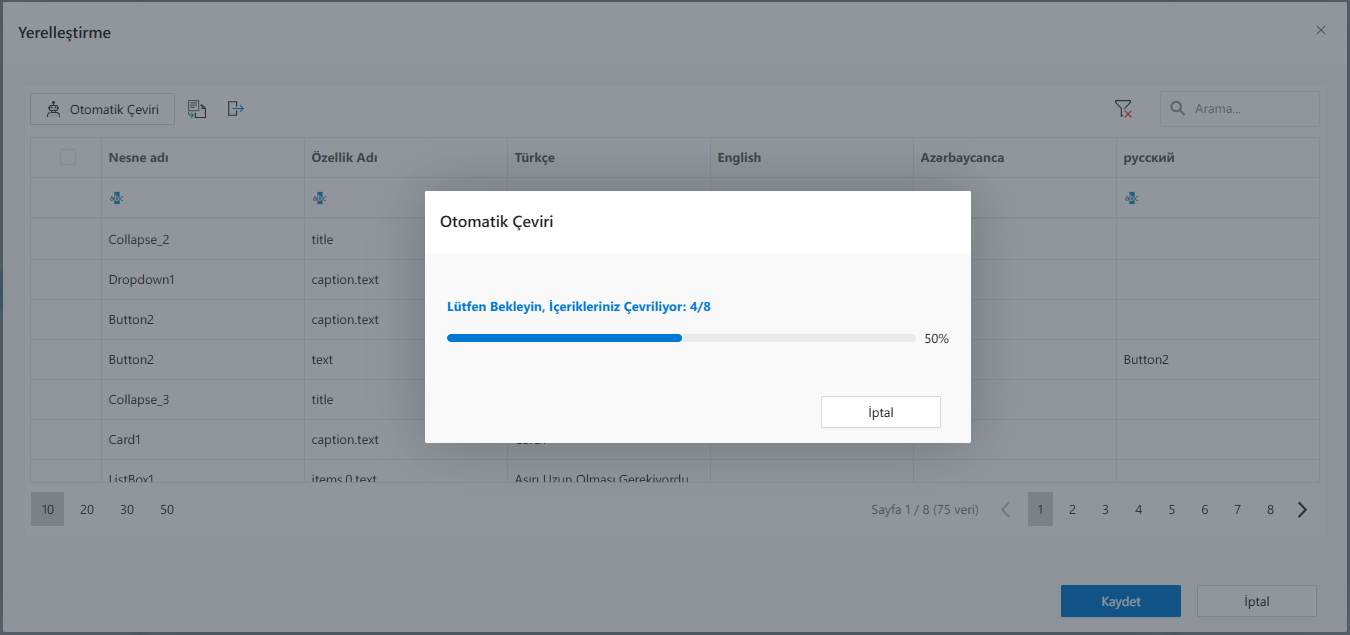
AI-Powered Localization – Performance Improvement
With the artificial intelligence support in the developer interface, the performance of artificial intelligence support in comprehensive projects was ensured by sending the data to the service in parts in the translation feature.
User Interface
Document Comparison – Comparison Between Versions
Necessary work has been done to make the comparison feature developed for MS Office and PDF type files without selecting a new file for the same file.
If there is a previously published version of the file on the comparison screen accessed through Document Management or the attachment file in the form, the option to select the relevant file opens when you hover over the file selection button. By clicking on the option, a different version of the relevant file can be selected and the comparison between the two versions can be made more easily.
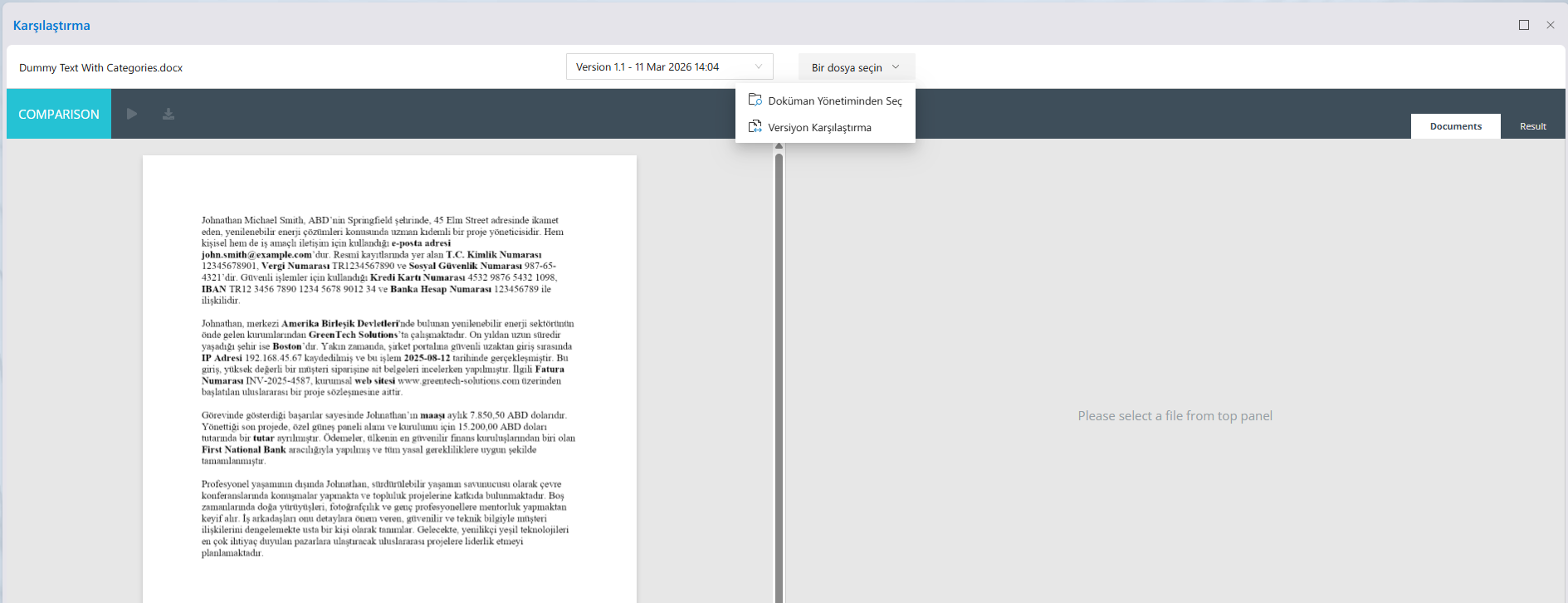
Document Comparison – Different Files Can Be Selected on the Comparison Screen
The document selected to be compared on the document comparison screen has been changed from the comparison screen, making it easier to compare with a different document.
Email Template/Multi-Language Support Revision
E-mails sent throughout Synergy were switched to a templated and multi-language support structure. Standard and corporate content was also created for emails created on the code side when there were no templates. In this context, revisions were made for e-mails sent in the following transactions:
- Activity Notification
- File Sharing
- Folder Subscription
- Forgot password
- New User
- Flow Notification
- Power of Attorney and Access Key Reminder
Audit Logging
Audit Logging is used to record by whom, when, over which IP and with what changes all critical operations taking place in the system are performed. These records; It is critical in security, compliance and audit processes.
The infrastructure used in the system is not only for logging; It operates within a broad observability framework that includes Monitoring, Logging, and Tracing components.
With the 2025 R2 version, the audit logging mechanism has been activated, recording all critical transactions taking place in the system.
In this context, user information, timestamp, IP address, request endpoint information, request and response bodies (with a limit of 32 KB) are recorded. The logging process is provided by collecting all logs centrally through OpenTelemetry Collector. The collected logs can be viewed through the preferred visualization and analysis tool (Kibana, Grafana, Jaeger, etc.). It is possible to export logs to external systems when necessary.
Log collection processes are optimized in batch mode, thus minimizing performance recording.
> NOTE: The default log retention period is 3 days. For longer storage, it is necessary to transfer logs to external systems.
Developer Interface
Datasource Versioning
Currently, version-based working support is provided only for data sources running on the most up-to-date version of the projects. In this way, it has been made possible to use data sources that are deleted, changed or added after a certain version in an uninterrupted and compatible manner in processes working with the relevant version of the project.
Scheduler Improvements
a. Scheduler Performance Improvements
Comprehensive structural adjustments and bug fixes have been carried out in the Scheduler infrastructure. The behavioral differences between triggers made with Personnel Access Token (PAT) and triggers without PAT have been eliminated, and manual resume logic has been introduced instead of automatic restart of erroneous jobs. Thus, in case of errors in long-term operations, jobs will be able to continue from the step where they left off, and stopped jobs will not run automatically when the system is restarted. In addition, the job stop/start feature has been added from the developer interface, and project and version conditions have been determined for these operations to be performed. Scheduler triggers provide hour and minute-based scheduling support along with date.
b. Bug Fixes and Technical Improvements
The problem of not being able to trigger flows due to execution limit calculation error, and not being able to rollback when scheduler receives an error has been fixed. Execution limit calculation is provided only in functions where the flow is advanced. Errors that occur in the scheduler are recorded in detail in the 'SCHEDULEREXCEPTIONS' table in the database. With these improvements, the stability of the system, the error detection process and the ease of management have been significantly increased.
AI-Powered Data Extraction/Masking
Instead of the single function in the ServiceAPI layer that performs data extraction/masked document operations, three new functions that perform data extraction, masking, and masked document creation have been added to the ServiceAPI layer.
The functions are currently only available for MS Word and PDF file types.
ExtractDataCategories
This function detects the data categories defined in the system in the specified document and returns them in JSON format. Along with the relevant data, the data category, the text block it is in, the reliability score and the format information values (for money and date) are also included in the response. When the information about which data types to fetch to the function is passed, only the relevant data is returned, and when it is left blank, the appropriate results are returned by searching for the following categories. In addition, the entire text content detected in the relevant document is returned.
Data Categories:
- Name Surname
- Address
- Identity Number
- Tax ID
- Social Security Number
- Credit Card Number
- IBAN
- Bank Account Number
- Institution Name
- Country
- City
- IP Address
- History
- Invoice No
- Website
- Salary
- Amount
- Bank Name
CreateMaskedData
It is the function that returns the data categories mentioned above in the document by masking them within the framework of the specified rules. Different masking methods can be applied for all categories of data. In response, the function returns the detected data, data type, confidence score, masked version of the data, original text block, and masked text block in JSON format.
Data Masking Methods:
- Show first letter
- Replace (a text is shown instead of data)
- Hide (data is removed completely)
- Show Restricted (you can specify how many characters at the beginning or end of the data are hidden/shown, as well as restrictions specific to date and currency type—show year only, show currency only, etc.)
CreateMaskedDocument
The specified document produces a document with data masking process applied by applying data categories and data masking methods. It works with the same parameters as the 'CreateMaskedData' function, instead of returning the applied masking options in response, it creates a new document with the masked data. The document is saved in the same directory as the document determined as input.
AI-Based Localization – Performance Improvements
Performance improvements have been applied to the function, which enables automatic translation of definitions in forms and flows in the developer interface with an artificial intelligence-supported function, and successful results have been achieved even when the number of definitions to be translated is high. Accordingly, definitions are sent to the translation function in groups instead of being sent all at once.
FUNCTIONAL IMPROVEMENTS
This section includes improvements to existing modules and features. Enhancements in areas such as web interface, document management, workflow management, mobile applications, and developer tools are listed to optimize user experience, improve performance, and support new usage scenarios.
User Interface
- 104076 – Screens that are open in navigation but not visible in the interface have been returned to the screen when you want to open them from the relevant menu link.
- 117658 – Visual improvements have been made to the proxy and access keys display, enhancing the user experience.
- 164107 – Upgraded the GoJS library used on the platform.
- 164871 – For performance improvement in the interface throughout Synergy, some necessary libraries are dynamically loaded at the time of use and more lightweight libraries are used.
- 174986 – In the artificial intelligence assistant panel, errors received in the artificial intelligence service are displayed on the interface with the appropriate error message.
- 175433 – Synergy version information has been stored in the browser memory and the current files required for the application to run can be downloaded in the background according to this information.
- 178108 – Fixed typos detected throughout the platform.
- 178190 – When logging into the system, the deploy agent requests defined in the projects are run sequentially, resulting in an increase in performance after login.
- 178331 – In Apache Superset Dashboard integration, parameter values can be sent via the menu link.
- 178380 – In cases where http requests made in the web interface fail, the request is repeated 3 times at 5-second intervals. Thus, the situation where the request could not be opened due to a momentary error was prevented.
- 114966 – An information message has been displayed in the flow form that users who are not authorized to open the activity messages they are tagged in, that they do not have authorizations in the flow.
- 175922 – Improved page loading performance on screens opened from external links.
- 178580 – The Ant Design UI library is a critical component for security, performance, and user interface consistency. In this context, the antd library, which has a project dependency, has been upgraded from version 5.22.7 to version 5.26.7. With the new version, it has been made more stable and security patches have been applied.
- 179054 – My Account -
>When MFA is activated from the security screen, the verification code e-mail content sent at the login stage has been improved to comply with the user language code.
Document Management
- 170233 – Throughout Synergy, the selection modal, which includes the details of the relevant items, has been enabled to be used as standard on the screens where folders or files are selected from the Document Management module.
- 178258 – Improved the appearance of the popover panel in the web interface, where the file upload process is shown.
Human Resources
- 178327 – In the Human Resources module, when a new user is added to the system, the password setting date is assigned.
- 178326 – With HRTransfer, the password setting date of newly added users to the system is also recorded in the system.
- 178392 – In the Human Resources module, the authorization error received by authorized but unauthorized users in the tabs such as user, position, etc. in the adding/editing of new records has been displayed on the screen with an appropriate error message.
Workflow Management
- 165024 – In case the approver position/user in the flow is inactive, the relevant warning message is displayed on the screen.
- 165201 – Enabled the flow to advance when the signing process is successful in mobile signature and digital signature transactions in the flow.
- 151231 – Workflow Management -
>The order of the forms shown in the Drafts list has been sorted so that the last processed project is at the top. - 171644 – Added the 'Do Not Round to Precision' feature to be used when the precision value specified in the NumberBox object is not desired to round according to the entered decimal value. When this feature is activated, only the specified number of digits is reflected on the object without rounding the decimal value entered into the object according to the precision value.
- 177456 – Records added in static datagrids selected as Associated or 'Save On: RowChange' can be sorted ascending or descending by default.
- 178845 – For flow approval, it has been enabled to enter a custom definition instead of the Canceled status shown to other users after the approval of a sufficient number of approvers. For this, it is necessary to specify text and icon for the Cancel event in the flow features.
Developer Interface
- 164658 – The default value of the 'ShowCancelledInHistory' and 'ShowTimeoutInHistory' properties, which allow canceled and timed out approval tasks to appear in the flow in the IDE, has been set to 'true'. When 'false', canceled/timed out tasks are not visible in the flow history and their visibility cannot be changed.
- 167123 – Enabled the ability to close open tabs in the IDE with the scroll wheel button of the mouse.
- 171655 – In the IDE, the datasource timeout period property value can be set as max: 75. This value is the maximum that nginx accepts.
- 172775 – Added the helper method 'this.isFastApproveMode()' that returns a boolean value for the typescript side of the form. When the relevant flow is approved with fast approve, it returns 'true'.
- 177357 – In the developer interface, the 'StepAttachmentType' enum has been used to determine the type of attachment file when sending e-mails with code, and the old enum 'MailAttachmentType' enum is also supported to avoid errors in existing functions.
- 175915 – When a project is run for the first time, when an error is received in migrations that need to be run in the background, e-mails are sent to the users specified in the 'System.Admin.Mail' parameter.
- 177747 – The 'ReportViewer' object, which allows reports created with ReportDesigner to be displayed in the form in the developer interface, can run the datasources used in the reports with dynamic parameters and the results suitable for the parameter are reflected in the report.
- 178288 – Enabled the 'OnBeforeSave' event to be triggered when using the 'toolbarSaveAsButton'.
- 178141 – Removed the active option in the parameters tab for GPT Query in the developer interface. The added parameters are considered active as they are also used in the prompt.
- 106221 – In the developer interface, the datasource timeout time property value can be set as max: 75. This value is the maximum that nginx accepts.
- 121295 – In the developer interface, the default value of the 'ShowCancelledInHistory' and 'ShowTimeoutInHistory' properties, which allow canceled and timed out approval tasks to appear in the flow in the flow, has been set to 'true'. When 'false', canceled/timed out tasks are not visible in the flow history and their visibility cannot be changed.
- 177457 – Added Default Sort field so that records added in static datagrids selected as Related or 'Save On: RowChange' can be sorted ascending or descending by default.
Mobile App
- 177062 – Clicking the web-managed back button on SmartView-looking forms in the Synergy mobile application closes the form and shows the previous screen in the mobile application.
- 177708 – The Card object in the form has been made compatible with SmartView.
- 177721 – Made the Ribbon object in the form work appropriately in the SmartView view in the mobile app.
- 177894 – Visual revisions have been made to the screens used in SmartView-looking forms in the Synergy mobile app.
- 178215 – Improved user experience by opening forms with SmartView view on mobile browser.
- 177844 – Menu icons can be displayed and the background color can be determined in the mobile application.
- 178258 – The appearance of the panel showing the file upload process in SmartView-looking forms in the mobile application has been made mobile-friendly.
- 178547 – Improved mobile display of the web page displayed when the platform is in maintenance mode and the unexpected error screen received during a transaction.
BUG FIXES
Under this heading, customer feedback and bug fixes detected within the scope of internal processes are included. Fixes to improve stability and resolve known issues in the web, mobile, document management, workflow management, and developer interface modules are detailed.
Reported Problems
- 173261 – When Document Management wants to pull certain files with ServiceAPI, a maximum of 200 data is returned when a take value above 200 is entered, since it cannot return more than 200 values, even if a value greater than 200 is given as 'take' in LoadOptions. Here, when the record value to be skipped as the skip value is entered correctly, data can be fetched in groups of 200.
- 173547 – After opening a flow form in the web interface, it is prevented from opening as a child form when the relevant form is opened again from the dashboard or menu, after being minimized to tab status with the home or back button. When it is reopened, the previously open form tab is closed and the form is opened with the new request.
- 173655 – Since the column property of datagrid objects in the developer interface is dysfunctional, it cannot be used for assignment or value control in the rule manager. For this reason, it is blocked from being used in the rule manager.
- 177372 – Fixed an error in the use of form-url-encoded type parameters for REST type datasources in the developer interface.
- 178378 – When accessing user details in the Human Resources module, it has been checked to have the authority to view users and view features, and the necessary authorization warning has been displayed.
- 179023 – The login page has been ensured to work responsively without being affected by scaling.
- 179027 – Made the Readonly and ClientEnabled properties of objects rendered in the mobile application work the same as on the web.
- 179033 – Made the app's title appear as loading instead of the default value due to the delay in refreshing the page.
User Interface
- 162385 – Synergy - Fixed the problem of the open screen of eBA turning off automatically when the Synergy menu is pinned in environments with eBA integration.
- 165998 – Visual improvements have been made to the login option with digital signature on the login screen.
- 166751 – If the user is in more than one authorization group, the problem of the change made in the authorization group not being reflected on the user has been examined. It was seen that the problem did not recur in the current version.
- 173648 – A blocked browser warning is displayed when trying to access Synergy, which is added to the BrowserManagement parameter in the configuration.
- 175368 – Enabled the ability to manage the 'MaxRequestBodySize' value from the project properties. This value can be increased for requests exceeding the 30 MB limit.
- 175450 – The authorization error warning message that occurs when the process/form approved by a different user is tried to be opened with an unauthorized user has been displayed in a way that the user can understand.
- 175896 – Typos detected on the security screen have been fixed.
- 176137 – The 'Archive flow id must be filled' error received during the archive form creation phase has been fixed and the archive form has been successfully created with the specified fields.
- 176162 – Fixed an issue when menu links added to the menu as external links were tried to be opened for the second time.
- 176601 – My Account -
>When Multi-Factor Authentication is activated from the Security Settings tab, the Verify button is activated after entering the PIN. - 176604 – Fixed a timeout error when loading activities.
- 176627 – Fixed an error when giving feedback to the response from the AI assistant in the web and developer interface.
- 176686 – On the task management screen, the Save button on the user/position selection screens has been made to be visible at a fixed width at the bottom right of the modal.
- 176717 – When a message is created or replied to an existing message in the Activities window, the scroll is at the bottom of the panel, showing the most recently shared new message.
- 177070 – Added dashboard in Apache Superset integration to open in Synergy.
- 177222 – Fixed the problem of incorrect occurrence of AI-generated links in the artificial intelligence assistant chat panel.
- 177644 – Made the number of jobs that appear in the process list in the dashboard consistent with the number of pending jobs.
- 178345 – Workflow Management -
>The problem that if the draft forms in the draft list are deleted, the number of work remaining in the relevant process cannot be calculated correctly instantly. - 178453 – The problem of images in e-mails created with default template or code not appearing in the e-mail content has been fixed.
- 179142 – Removed the authorization check for changes made by the user to the My Account -
>Security screen.
Workflow Management
- 166088 – Fixed the issue of event forms opened in the background from the form opened with modal or drawer.
- 169319 – If the selection made for a specific date in the DateTimePicker object is canceled with code, the relevant date is reverted in the object.
- 173915 – Improved the display of documents with required fields in flows with multiple documents with required fields to be user-friendly.
- 175125 – Fixed the problem of not being able to add files to the RelatedDocuments object from the Document Management system.
- 175135 – Provided that the appropriate error message is displayed when a file of an unsupported type is requested to be added to the RelatedDocuments object in the form.
- 175140 – Fixed the problem of URL and Text headers shifting into the input field of the object in the link insertion panel in the HTMLTextBox object.
- 175141 – Temporarily removed full-screen mode due to a chronic visual issue in full-screen mode in the library belonging to the HTMLTextBox object. It will be reactivated when the necessary work is done by the supplier in the object library.
- 176188 – The error that occurred when saving the indexed data in the form when the flow was started has been fixed.
- 177120 – When word wrap is active in the ComboBox object with the word wrap feature turned on in Datagrid, the selected data is shifted to the bottom row and all of it is displayed in the cell.
- 177129 – Fixed the problem of deleting all selected options when one of the selections made in the Lookup object with the multi-selection feature enabled was removed.
- 177314 – The problem of the flow form not opening due to the change of the SDK version of the relevant project as a result of the re-publication of the same project in the new version after the flow started from the projects published before 2025 R1 has been fixed.
- 177354 – Fixed the visual distortion issue in the selection panel as a result of incorrect sizing of the icons used in the options in the ComboBox object in static datagrids.
- 177358 – The problem of rows added to the static datagrid not being reflected in the datagrid has been fixed.
- 177375 – Fixed an appearance issue in flow forms containing static datagrids.
- 177720 – Since it is not possible to check the Check Unique Value in image columns in Datagrid, this control has been bypassed in this type of columns.
- 177881 – Enabled the activity panel to always be displayed at the top of drawer or modal type forms.
- 177904 – The error in the export to excel function in Datagrid has been fixed and the export process has been performed successfully.
- 177922 – Fixed a style issue when filtering in Datagrid columns.
- 177957 – Applied the 'pendingEdit' control correctly in Datagrid, allowing it to switch to 'false' status when editing is complete.
- 177964 – Blocked from setting Datagrid image type columns as primary keys.
- 177965 – The problem of the flow form not opening due to the change of the SDK version of the relevant project as a result of the re-publication of the same project in the new version after the flow started from the projects published before 2025 R1 has been fixed.
- 178091 – The problem of the selection not being experienced when you want to add files from different sources to the FileSelector object has been fixed with the renewal of the selection modal.
- 178107 – Fixed a null value error when opening a workflow.
- 178159 – Problems in the opening/closing behavior of panels in Workflow Management have been fixed.
- 178204 – The console error that occurred in the datagrid, which was hidden as 'visible: false' in the form, has been fixed.
- 178209 – When the form is stuck in validation, the relevant warning messages are displayed on the screen, allowing the form to exit the loading status.
- 177994 – In the web and mobile application, the name information is displayed in case the flow caption information of the flows is not available.
- 178360 – The project has been enabled to respond with the retry mechanism for errors in the requests made to the project.
- 178388 – Fixed an issue where the form remained in readonly mode when the form printing process was canceled.
- 178403 – Fixed an issue where not listing entire workflows when the browser resolution was below 100%.
- 178478 – The problem that occurred as a result of incorrectly checking the indexable feature of the form data and preventing the form from being saved has been fixed.
- 178484 – Removed the use of activities in draft forms and flows due to their infunctionality.
- 178494 – Fixed a request error when using the Tabs object in the form.
- 178507 – JSON parse error that occurred while saving the form has been fixed.
Document Management
- 177467 – Fixed the issue where files with .zip extension were downloaded with the wrong extension in the Document Management module.
- 173272 – The problem of transferring search results to Excel with the Export to Excel option in the Advanced Search function in the Document Management module has been fixed.
- 176196 – If the document to be viewed is not in a format supported in the system, a warning message is displayed on the screen.
- 177999 – Fixed an issue where panels closed when the flow history was open.
- 178021 – In the selection objects in the form (Lookup, Dropdown, Combobox, Tagbox), the data with dynamic datasource is separated according to the selected value value.
- 178546 – Multi-language support has been provided for error messages that occur during document signing with Docusign.
Human Resources
- 178354 – The error that occurs when the user performing operations in the Human Resources module does not have editing authority has been fixed and only viewed.
- 178896 – Human Resources -
>When a feature is wanted to be deleted in the Features tab, the problem that the warning messages that should be shown when the relevant feature is in use are not reflected on the screen has been fixed. - 155270 – Provided that temp table requirements in HR transfer process are based on the relevant parameters:
- 'TMP_HRUSERS' =
>mandatory //non-parametric - 'TMP_HRDEPARTMENTS' =
>mandatory //nonparametric - 'TMP_HRPROPERTIES' =
>'Configuration.TransferProperties' - 'TMP_HRPOSITIONS' =
>'Configuration.MultiplePositionsEnable && Configuration.TransferPositions' - 'TMP_HRGROUPS' =
>'Configuration.TransferGroups' - 'TMP_HRCOMPANIES' =
>'Configuration.TransferCompanies' - 'TMP_HRMANAGERS' =
>'Configuration.TransferManagers'
- 'TMP_HRUSERS' =
Developer Interface
- 177475 – Performance improvements have been made for the stages of opening the project and its files.
- 163484 – The error received after the change made in the project properties in the IDE has been fixed.
- 163849 – Fixed the problems of project build files being created without a version or multiplexing for the minor version in the project deploy process.
- 167478 – When a value of the Assign a Dynamic Value type is assigned with the rule manager in the developer interface, the action is not performed as it would be unnecessary to assign the same value as the previous value of the relevant object.
- 168592 – Provided that the template used in the emails sent in the flow is edited, the updated template comes in the Edit Message Source operation during the flow design.
- 173767 – Fixed the problem that when 'value type: integer' is selected in the RadioList object, a static option selected by default is not selected.
- 174850 – Fixed an issue where Report Designer could not be opened in the developer interface.
- 174876 – Fixed a Report Designer saving bug in the developer interface.
- 175146 – The error that occurs when datasource selection is made in selection objects has been fixed.
- 175236 – In the developer interface, it has been enabled to select the relevant zip formatted files from the Document Management module in the project import modal.
- 175290 – Fixed UI bugs in the index form panel in the IDE.
- 175393 – The error of not being able to load the mail profiles received when opening the current flow or defining the flow in the IDE has been fixed.
- 176137 – The 'Archive flow id must be filled' error received during the archive form creation phase has been fixed and the archive form has been successfully created with the specified fields.
- 176229 – When the 'getIconHTML' method is used, the icon is rendered after loading.
- 176571 – It was ensured that the GPT Query information selected in the GPT Prompt object in the flow was not lost when the project was compiled, and it was ensured that GPT Query could be run successfully when the relevant work step was reached.
- 176694 – The multiplexing problem of two primary keys in the Columns field has been fixed when the datasource type value of the datagrid is changed from dynamic to related.
- 176713 – When the Show all steps option is selected on the steps screen in the flow manager, all objects in the relevant version of the flow are visible.
- 177018 – Fixed a record deletion error when the DataSources in the project are run.
- 177025 – Fixed a multiplexing issue of DataSource elements in project files.
- 177064 – Undo Changes option applied to the project in the developer interface has been made to revert only the changes made in the relevant version that have not been saved.
- 177147 – Fixed the problem that the datasources selected after deployment in the developer interface did not appear in the datasource selection mode in objects containing datasources.
- 177192 – The import error received when the Save Path information in the RD object used in the form in the relevant project is left blank in the project import process in the developer interface has been fixed.
- 177364 – Fixed bugs that occurred during project import.
- 177589 – Required rules for projects imported in the developer interface are transferred to the target environment in the same way.
- 177909 – Fixed an error when modifying project files in project import.
- 178075 – Fixed an issue where rules were broken when editing mandatory fields, which could be done by removing the edit lock in the rules manager.
- 178339 – Fixed an issue where the variable linked to the assignment object appeared empty in the flow manager.
- 178425 – Fixed a null reference error when listing projects in the developer interface.
- 178637 – The codes written in the 'OnAfterFileAdd' event of the Associated Documents object have been made to work.
- 179006 – Fixed the problem of duplicate bin and publish folders in the project folder when minor deploy is taken in projects.
- 162517 – Log messages of the publishing process that starts after import in projects are displayed to the user in real time before the modal is closed.
- 162598 – A validation warning has been provided when a query is requested to be run without saving GPT Query Return Fields.
- 179193 – Fixed a multiplexing issue of a selection (approve/reject) made in the Before Processed Events field in the position object.
Mobile App
- 164013 – In the Synergy iOS mobile application, in Native+ looking forms, the time information is displayed as 00:00 when the time information is also included in the Display Format, even though ShowTime is turned off in the DateRangePicker object.
- 164018 – Fixed an error when the line height value is given in decimal for the Label object in the developer interface.
- 164627 – Fixed a timeout error while compiling a project.
- 165054 – Forms that are incompatible with the database (e.g. containing a column with the same name) in the project are detected during compilation or publishing, and the process is stopped with a validation message.
- 165086 – The New Item and New Folder buttons in the Solution Explorer panel of the IDE interface have been removed from the top. In the sub-breakdowns in Solution Explorer, the right-click menu is listed with the options for the relevant breakdown.
- 172817 – When entering data into the NumberBox object in SmartView looking forms, the numeric keyboard has been opened so that only numerical data can be entered.
- 177115 – In the Synergy mobile application, the problem of opening the dashboard in the browser view when exiting the open form in SmartView view forms has been fixed and the static mobile dashboard screen is displayed.
- 177131 – The grid view problem experienced when the selection screen is opened in the Lookup object in forms opened in the mobile browser has been fixed.
- 177157 – Fixed the issue of data being processed as text in increment/decrease operations made with the + - buttons in the NumberBox columns in forms opened from the Safari browser on iOS devices.
- 177174 – Fixed an issue where the DateRangePicker object could not be selected in forms opened from the Safari browser on iOS devices as a result of changing the date selection type.
- 177176 – Fixed an error when selecting in the DateRangePicker object in forms opened from the Safari browser on iOS devices.
- 177177 – The problem of the values in the DateRangePicker object not fitting on the screen in forms opened from the Safari browser on iOS devices has been fixed by displaying the forms with the SmartView view in the mobile browser.
- 177316 – Fixed an appearance issue that occurred when comparing files over the RD object in forms opened from the Safari browser on iOS devices.
- 177332 – Improved the appearance of streaming history in the Synergy mobile app.
- 177349 – The problem of the step buttons of the NumberBox object not fitting on the screen in forms opened from the Safari browser on iOS devices has been fixed with the transition to SmartView view.
- 177359 – In the TimePicker object used in the static datagrid in SmartView view forms in the mobile browser, the obligation to select the date while selecting the time has been removed, allowing only the time selection to be made.
- 177401 – Fixed an issue where the placeholder text specified in the NumberBox object was not visible in SmartView looking forms.
- 177402 – In the Synergy mobile application, it has been enabled to enter negative value data in NumberBox objects in SmartView-looking forms.
- 177459 – Fixed the issue where the modal selected by the user to be redirected does not open when Forwarding Options are active on the position object in SmartView looking forms in the Synergy mobile application.
- 177496 – Fixed a delay in MaskInput data entry on SmartView-looking forms in the Synergy mobile app.
- 177498 – In the Synergy mobile application, if there is no mask format specified in the MaskInput object in SmartView-looking forms, the object works like a TextBox.
- 177501 – Fixed a save error in the MaskInput object in SmartView looking forms in the Synergy mobile application.
- 177517 – Fixed an issue where the loading screen did not close when opening SmartView-looking forms in the Synergy mobile application.
- 177616 – Addressed issue where values assigned to NumberBox were not visible in SmartView.
- 177649 – Updated the selection panel type in TimePicker, DateTimePicker, and DateRangePicker objects to roller picker in SmartView view forms in the Synergy mobile app.
- 177671 – Removed unnecessary space in the first column of the datagrid when using SmartView.
- 177673 – The visual problem experienced in the date selection panel when the selected date is reset in SmartView looking forms in the Synergy mobile application has been fixed.
- 177678 – The error that occurs when entering data through the datagrid in forms with SmartView view has been fixed.
- 177785 – Screens that open as drawers or modals in the Synergy web interface are opened in the panel in SmartView-looking forms in the mobile application.
- 178268 – Fixed an issue where a blank panel was opened when there was no data source to select in the ComboBox object in the Synergy mobile app and mobile browser.
- 178365 – In order for users to use the Synergy mobile application, the Mobile Application - Access authorization existing in the system has been valid. This authorization was previously non-functional, and this authorization must be granted for users who cannot access.
- 178680 – Fixed an issue where the flow history remained in the loading phase in the Synergy Android application.
- 179153 – The issue of workflow forms not opening through the dashboard and Workflow Management in the Synergy Android application has been fixed.
- 177461 – Implemented missing authorization checks for users' power of attorney and access keys screens in the Synergy Android application.
- 177681 – In the mobile application, the date selection field in the static datagrid in SmartView view forms has been opened in the roller picker type as the other standard.
Breaking Changes
> Important: The following changes may affect your existing apps. Please make the necessary updates.
- Shadow DOM Change: As of the 2025 R1 version, Shadow DOM enhancements have been made to ensure style isolation of form objects. With this change, it is no longer possible to access objects directly from the global 'document'.
To access objects in the Shadow DOM, the newly created helper method called 'getDocument' should be used.
For example; Previously used to access object 'Cart1':
'''JavaScript document.querySelector('#Cart1');
function should be replaced by the following code block:

'''JavaScript
const formDocument = this.__form.getDocument();
formDocument.querySelector("#Cart1");
- Lookup Object – 'setSelectedItems' Method: Assigning text and value values to the lookup object with client side code is not sufficient for the value assigned by the code to be fully reflected in the object. In addition, the 'applyChanges()' and 'getSelectedItems()' methods must also be called. For this purpose, the relevant functions should be called or the 'setSelectedItems()' helper method should be used, which performs the same function.
In both cases, the desired result is achieved.
Alternative 1:
'''JavaScript this. lookup1.value = 1; this. lookup1.text="Choice 1"; await this.applyChanges(); this. Lookup1.getSelectedItems();
**Alternative 2:**

'''JavaScript
this. Lookup1.setSelectedItems(1, "Selection 1");