REVISION / ACTION CANCELLATION FUNCTION IN THE REJECTION PHASE OF RISK FORMS
The assessment of risks may be revised on a form basis. If a rejection type button is defined and rejected during the revision phase of a form, the actions planned up to that stage can be canceled. The Event Notification value No. 4 found during button definition (SAT > Risk Notification > Function Designer) is entered with the "Button Identification" button. While the relevant "Reject" button is defined, these functions can be configured when a record is rejected thanks to the "Cancel Revision" and "Cancel Open Actions" check boxes.
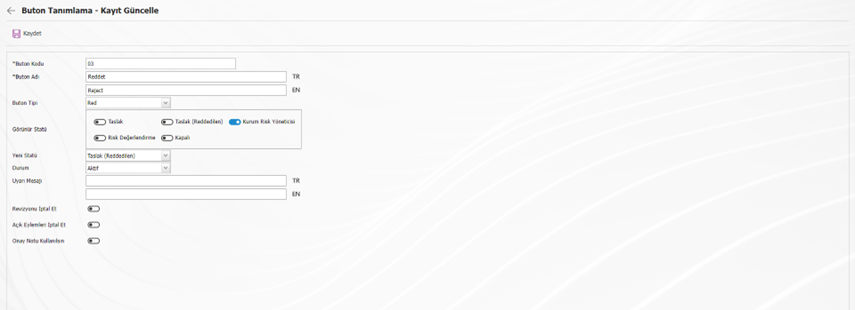
Cancel Revision Function
If a risk form is as it was first entered, that is, 0. If the Reject button is used in the revision, the record will be deleted directly because the "Cancel Revision" check box is checked. The form will no longer appear in the QGRC Risk Statement.
Let's assume that the form is 1. If it is rejected, the relevant form is 0. It will return to its closed status in the revision and continue to be listed in the system.
Cancel Open Actions Function
The actions planned in the risk form will be canceled and deleted from the system after the rejection button, and the tasks will be removed from the pending work of the persons who will perform the action task / responsible for the action.